Helping someone having an Epileptic seizure

Something completely different than what you might expect to find here…

My partner is an epilepsy sufferer, and was very open about this early on in our relationship, while we were still really at the dating stage. Her epilepsy had been under control for a long while and she hadn’t had a seizure in over ten years.

A couple of years ago, the seizures started to happen again. Still relatively rare, with a long gap (of a few months) between them, and usually with a fairly clear initiator: in her case the seizures are triggered due to lack of rest, so they would happen if she’d just flown a ‘red-eye’ flight in economy class and got no rest, or if she’d had very broken sleep because of some other problem such as a bad cough, cold or flu.

A further complication is that every time an epilepsy sufferer has a seizure and crumples to the ground, there is a chance they will hurt themselves when they fall. In my partner’s case, she almost always falls to the same side, and it’s caused problems in her right arm and shoulder.

This has the ability to initiate a “vicious circle” – have a seizure, hurt your arm, have the pain from your arm affect your quality of sleep, to the extent that you have another seizure, and your arm which was slowly recovering is now even more painful. Lather, rinse, repeat…

So this was the position we found ourselves in. The seizures becoming more frequent. One problem exacerbating the other.

Nothing can prepare you for the first time you see someone you care about have an epileptic seizure. I’m a (lapsed) First Aider, and even though I’ve helped someone having a fit in the past, it’s different when it’s a person you know going through the process of a seizure. It really is quite a shock as the person you expect to find is “absent” during the seizure, but for their sake, you have to try and stay calm and keep a lookout for them until the fit has passed.

Here’s a few hints to help you help someone having a seizure:

Continue reading “Helping someone having an Epileptic seizure”

Life imitates parody twitter accounts…

Everyone loves to moan at UK transport operators. Me included. Too slow, too crowded, late, early, unreliable, you name it.

Many now use social media as a powerful method of quickly getting service information out to customers, but this has also given rise to the parody twitter account – gently mocking the real organisation – for instance TlF Travel Alerts and Southern Trains – the latter of which is often confused by real frustrated commuters with the real operator. Hilarity ensues.

So, this tweet shot past this morning from South Eastern trains…

se_tree_tubes

Seems reasonable, right? But to the average Londoner, this shouldn’t make sense. For those unfamiliar with Kentish geography, Stonegate & Robertsbridge are about 50 miles from London. How’s that got anything to do with the Tube accepting tickets?

It reads like something the parody TlF account would say! “Due to event A, completely unrelated consequence B will apply”

So, did their twitter account get hacked? Or just some automated system gone haywire?


Getting info out of your HomePlug AV Network

I recently blogged on the trials and tribulations (and gotchas) of using HomePlug AV to glue bits of network together around the house without having to run UTP around the place.

One of the comments I’d made in that article was about monitoring and logging the node-to-node speeds between the HomePlug bridges. Obviously, being a consumer product, they come with a pretty (and depending on your PoV, awful) GUI.

How was the information being gathered by the GUI? Turns out it’s using a Layer 2 protocol, so I cracked out Wireshark.

The head and tail of it is that the requesting station sends a L2 broadcast frame of ethertype 0x88e1 (Homeplug AV), containing a network info request.

The HomePlug bridges reply to the MAC address originating the broadcast with a network info confirmation – there are other sorts of management frames (such as read module data and get device/sw version), but this is the bit we’re interested in, containing the negotiated speed between each pair of bridges.

The speeds are plain hex values, which occur in certain places in the frame.

homeplug-av-frame

The number of networks (and therefore how many instances of “Networks informations“) to expect are in byte 21 of the frame, and the number of AV stations in a network is embedded in byte 17 of the Networks Informations, so you then know how many sets of stations informations to expect.

In the stations informations the address of the far end HomePlug bridge is in the first 6 bytes, while the TX rate is in byte 14, and the RX in byte 15.

It should therefore, maybe with a bit of scripting, be possible to grab those values and write them into a rrd or something like that, and make graphs, rather than have to fire up a GUI which only helps you in realtime. But here I am talking about banging away with my awful scripting crafting specific L2 frames and interpreting what comes back using regex matching and chomp. Surely someone’s done something like this before, and come up with something more elegant?

Well it turns out, github is your friend, as it seems are the people at Qualcomm Atheros who make the chips inside a lot of the HomePlug devices.

They’ve put up something called Open Powerline Utils – which I think may be able to do the job I want.

So, when I get a free evening, I’ll have a read of the docs and see what can be boshed together using this toolset rather than some ugly scripts.

Releasing a bottleneck in the home network, Pt2 – at home with HomePlug

As promised the next instalment of what happened when I upgraded my home Internet access from ADSL to FTTC, and found that I had some interesting bottlenecks existing in what is a fairly simple network.

Last time, I left you hanging, with the smoking gun being the HomePlug AV gear which glues the “wired” part of the network together around the house.

HomePlug is basically “powerline networking”, using the existing copper in the energised mains cables already in your walls to get data around without the cost of installing UTP cabling, drilling through walls, etc. As such, it’s very helpful for temporary or semi-permanent installations, and therefore a good thing if you’re renting your home.

The HomePlug AV plant at Casa Mike is a mix of “straight” HomePlug AV (max data rate 200Mb/sec), and a couple of “extended” units based on the Qualcomm Atheros chipset which will talk to each other at up to 500Mb/sec as well as interoperate at up to 200Mb/sec with the vanilla AV units.

One of the 500Mb units is obviously the one in the cupboard in the front room where all the wires come into the house and the router lives. However, despite being the front room, it’s not the lounge, that’s in an extension at the back, so the second 500Mb unit is in the extension, with the second wifi access point hanging off it so we’ve got good wifi signal (especially 5GHz) where we spend a lot of our time. The other 200Mb units get dotted around the house as necessary, wherever there’s something that needs a wired connection.

So, if you remember, I was only getting around 35Mb/sec if I was on the “wrong side” of the HomePlug network – i.e. not associated with the access point which is hardwired to the router, so this was pointing to the HomePlug setup.

I fired up the UI tool supplied with the gear (after all, it’s consumer grade, what could I expect?), and this shows a little diagram of the HomePlug network, along with the speed between each node. This is gleaned via a L2 management protocol which is spoken by the HomePlug devices (and the UI). I really should look at something which can collect this stuff and graph it.

HomePlug is rate adaptive, which means it can vary the speed dependant on conditions such as noise interference, quality of the cabling, etc., and the speed is different for the virtual link between each pair of nodes in the HomePlug network. (When you build a HomePlug network, the HomePlug nodes logically seem to emulate a bus network to the attached Ethernet – the closest thing I can liken it to is something ATM LAN emulation, remember that?)

The UI reported a speed of around 75-90Mb between the front and the back of the house, which fluctuated a little. But this doesn’t match my experience of around 35Mb throughput on speed tests.

So where did my thoughput go?

My initial reaction was “Is HomePlug half-duplex?” – well, turns out it is.

HomePlug is almost like the sordid love child conceived between two old defunct networking protocols, frequency-hopping wifi and token ring, after a night on the tequilas, but implemented over copper cables, using multiple frequencies, all put together during an encoding technique called Orthogonal Frequency Division Multiplexing (OFDM).

Only one HomePlug station can transmit at a time, and this is controlled using Beaconing (cf token passing in Token Ring) and Time Division Multiplexing between the active HomePlug nodes, orchestrated by the concept of a “master” node called a “Central Coordinator”, which is elected automatically when a network is established.

When you send an Ethernet frame into your HomePlug adaptor, it’s encapsulated into a HomePlug frame (think of your data like a set of Russian Dolls or a 1970’s nest of tables), which is then put in a queue called a “MAC frame stream”. These are then chopped up into smaller (512 byte) segments called a PHY block, the segments being encrypted and serialised.

Forward error correction is also applied, and as soon as the originating adaptor enters it’s permission to transmit (it’s “beacon period”), your data, now chopped down into these tiny PHY block chunks, is striped across the multiple frequencies in the HomePlug network. As they arrive at their destination, acknowledgments are sent back into the network. The sending station keeps transmitting the PHY blocks until the receiving node has acknowledged receipt.

Assuming all the PHY blocks that make up the MAC frame arrive intact at the exit HomePlug bridge, these are decrypted, reassembled, and decapsulated, coughing up the Ethernet frame which was put in the other end, which is written to the wire.

The upshot of this is that there’s a reasonably hefty framing overhead… IP, into Ethernet Frame, into HomePlug AV MAC frame, into PHY block.

Coupled with the half-duplex, beaconing nature, that’s how my ~70Mb turned into ~35Mb.

The thing to remember here, the advertised speed on HomePlug gear is quoted at the PHY rate – the speed attainable between HomePlug devices, which includes all the framing overhead.

This means, where HomePlug AV says that it supports 200Mb/sec, this is not the speed you should expect to get out of the ethernet port on the bottom, even in ideal conditions. 100Mb/sec seems more realistic and this would be on perfect cabling, directly into the wall socket.

Talking of ideal conditions, one of the things that you are warned against with HomePlug is hanging the devices off power strips, as this reduces the signal arriving at the HomePlug interface. They recommend that you plug the HomePlug bridge directly into a wall socket whenever possible. Given my house was built in the 1800s (no stud-walls, hence the need for HomePlug!), it’s not over-endowed with mains sockets, so of course, mine were plugged into power strips.

However, not to be deterred, I reshuffled things and managed to get the two 500Mb HomePlug bridges directly into the wall sockets, and voila: Negotiated speed went up to around 150-200Mb, and the full 70-odd Mb/sec of the upgraded broadband was available on the other side of the homeplug network.

Performance is almost doubled by being plugged directly into a wall socket.

In closing, given everything which is going on under the skin, and that it works by effectively superimposing and being able to recover minute amounts of “interference” on your power cables, it’s almost surprising HomePlug works as well as it does.

This HomePlug white paper will make interesting reading if you’re interested in what’s going on under the skin! 

My local bakery is going stale…

When we moved here, we were really happy to see that the local cluster of shops (useful stuff like Post Office, Chemist, Dry Cleaners, a small super market) that serves our neighbourhood also had one of a dying breed, a traditional baker’s shop, part of a small chain owned by a family business.

Sure, the bread wasn’t made in the shop, they had a more modern bakery in a light industrial unit about 30 minutes drive away which supplied all their shops and wholesale customers, but they sold great tasting loaves with a fantastic light texture and crispy crust.

My stomach really can’t hack cheap supermarket bread, either bulked up with high percentages of soy flour to help improve the consistency of the crumb, or made with more yeast than is necessary to reduce the time needed to prove. Both upset my insides, causing me bloating, discomfort and in some cases, pretty bad indigestion.

So I was delighted when shortly after moving here, the indigestion just stopped dead. The only thing which really changed in my diet was where the bread was coming from (aside from possibly the water coming out of the tap). I even tested this theory by eating regular mass-produced bread, and the gut rot came back within a few days.

Relieved to put a calmer stomach down to the nice crusty bread on my doorstep, it just reinforced all that was good about our new neighbourhood.

Sadly, all good things must come to an end. While the bakery hasn’t closed down, it has recently changed hands, and is now being supplied by the new owners – still a small, local bakery, but it turns out, it isn’t quite the same.

Not to be daunted, we tried a few things from there over the last couple of weeks, only to feel let down.

The breads don’t look the same: uneavenly risen, with a pale and flaccid crust concealing a spongy, yet heavy, dense, interior, with a cotton-wool-like texture. Neither do they smell the same: there’s an overriding smell of yeast about the new owner’s bread.

The old owner’s recipe would go stale by going dry and hard, and would seldom go mouldy. The new owner’s bread goes mouldy, because it seems to retain the moisture for longer.

Sadly, this also extends to their pastries, which leave a feeling like the inside of your your mouth has been coated in a layer of vaseline (I guess they don’t use butter, but some sort of margarine or veg shortening) as well as being so sweet that you get the shakes.

While we’re glad that it’s stayed a bakery, rather than becoming yet another hairdresser, nail bar, beauticians or (our first!) fried chicken shop, we’re gutted that we’ve lost our supply of traditionally baked bread that was on our doorstep.

80 down, 20 up, releasing a bottleneck in the home

A couple of weeks ago, I upgraded the Internet connectivity at home, from an ADSL service which could be a little bit wobbly (likely due to poor condition on some of the cabling) and usually hovered between 2Mb and 3Mb down, to FTTC – reducing the copper run from about 3.5km down to about 200m.

The service is sold as “up to 80Mb/sec” downstream, with upload of up to 20Mb/sec, which turns out to be achievable on my line, as my ISP’s portal reported the initial sync as 80Mb, and this gives around 75Mb of usable capacity at the IP layer once you’ve knocked off the framing and encapsulation overheads.

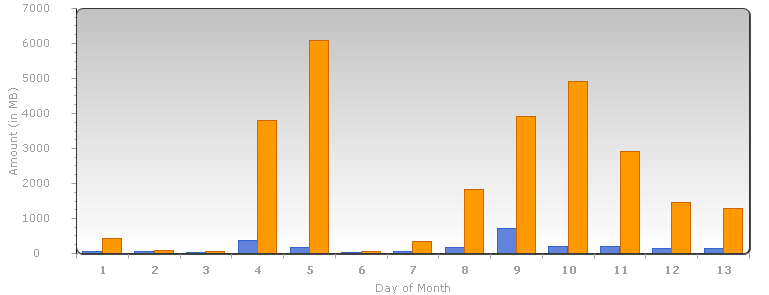
I eagerly headed off to thinkbroadband.co.uk and speedtest.net to run some tests. They confirmed I’d only get 40Mb/sec until I replaced my trusty but ageing Cisco 877 – that’s one bottleneck I already knew about and had a replacement router coming. But, never the less, I was happy with a >10x uplift on the previous downstream speed, and off I went happily streaming things, as can be seen from my daily usage…

Guess when I switched to FTTC?

Yes, some of that usage in the first day or two would have been repeatedly running speed tests in giddy abandon at the bandwidth at my disposal, but the daily usage is now generally higher.

There’s a number of reasons that could be behind that, but I suspect that among the most likely are services which support variable bit-rate video delivery, which include things such as YouTube and BBC iPlayer will be automatically upping to the higher quality stream.

The new router arrived on the 9th, and it was off with the speedtests again… and that’s where I found an interesting bottleneck in the house.

I could happily get 75Mb/sec in one room – where the router and main access point was. However, in the lounge, which is in an extension at the back of the house, I could only get around 30Mb/sec, despite having an access point in the same room.

I’ve ended up with multiple access points in the house, because the original “cottage” was built in 1890 and has fairly thick walls made of something very, very tough (from experience of hanging up pictures) which is also largely impervious to radio waves it seems, while the extension is attached to the “outside” of one of the original external walls, as well as being the furthest point away from where the Internet access comes into the house. This meant that I wasn’t left with much choice but to infill using a second wireless AP.

But both APs are of a similar spec and support 802.11a/b/g/n, and I was connecting on the less congested 5Ghz spectrum on both. So, where was the bottleneck?

The attention turned fairly quickly to the HomePlug AV network which I was using between the front and back of the house. It hadn’t caused me much concern in the past, but now it was prime suspect in my quest to wring the maximum out of my shiny new upgraded circuit.

Finding the longest piece of cat5 cable I have (a big yellow monster of a cable), and running that through the middle of the house to the AP, revealed that my suspicions were correct, but I also knew that the bright yellow cable snaking through the kitchen couldn’t stay there.

In the next few days I learned more about HomePlug than is probably healthy, and that will form the basis for my next article…

A local map for local people

Nothing for youuuu here!
A Local Map for Local People

I love maps.

I’ve been fascinated by them ever since I was a child. We’d get the appropriate maps out of the local library and play along with Treasure Hunt on the TV. It had nothing to do with Anneka Rice in a jumpsuit. I was more interested in the maps, the tech (remember those colossal two-way radio packs?) and the helicopters. At least initially…

I could spend hours pouring over maps and atlases, and make boring rainy days indoors simply flash by.

In the UK, official maps are published by the Ordnance Survey, a UK Government department which is the official mapping agency for Great Britain – but not Northern Ireland, if the omission of Northern Ireland confuses you, then CGP Grey can explain – not why the OS doesn’t cover Northern Ireland, but the whole UK/GB/NI distinction. Anyway, I digress.

I live on the edge of South East London, well if I ask the Post Office I live in Kent, even though I’m a resident of a London Borough, have to pay for the Metropolitan Police, and get to vote for the Mayor. One of the advantages of living out here is that there’s lots of lovely green belt to go walking through.

Now, the disadvantage. The OS make lovely 1:25000 scale maps (the “Explorer” series) which are aimed at outdoor leisure. The downer is that I live almost on the join of four of the map sheets, so when I go for a day out walking, I often need to take at least two maps, and as many as all four, with me, along with their extraneous detail of places I’m not going to, such as Lewisham, Peckham, Barking and Croydon.

Before anyone asks “Why don’t you use your phone?”,  even though you are tantalisingly close to civilisation and 3G (or even 4G) mobile data, you’re not that close. Deep in the woods, you’re far enough away to have poor or no service, and most mobile mapping products don’t have things walkers need like contour information.

So, as quaint as they may seem in this age of satnav and gps, paper maps it is for your weekend amble through the local countryside.

The boffins at the OS have a solution to “living on the join”: Custom Made maps (ta-dah!). You go online and define what area you want covered by the map (e.g. plonk your house, or somewhere close to it, in the middle if you like) and they will print it from the digital source maps, after you’ve given them some money (£17 in this case).

You get to choose what it says on the front, and you can even upload your own cover image (or choose one from their library of inoffensive landscapes).

Now that Summer is allegedly round the corner, I thought I had a perfect excuse to get one. No offence to Lewisham intended, but I’m tired of carrying you around in my day pack.

They laser print it on some humungous laser printer, maybe have a bit of a laugh at your choice of subtitle, package it up and it lands on your doormat a few days later. Exciting, eh?

For those who love geeky details, it even gets it’s own ISBN number. Coo. Right, best find my walking shoes…

Product placement vs. artistic statement

If anyone has happened to watch a Lady Gaga music video, you can’t have helped notice the appearance of commercial products.

So, the question is…

Is it just blatant product placement to help defray the costs of making a music video?

-or-

An artistic statement by Gaga about the commercialism and consumerism of our everyday lives?

Shallow? Or deep? Just wondering…

Could a bit of cultural sensitivity help make better tech products?

A post from a person I follow on twitter got me thinking about tech product development…

Dear Word for Mac 2011: No.

This was on a Mac in the UK. With a UK keyboard. With the system locale set to UK. With the system language set to British English.

Yet the software offered an autocomplete using the American styling of “Mom”, seemingly ignoring the locale settings on the machine!

Okay, it’s not escaped me that Word for Mac is a MSFT product. So maybe this is about cultural insensitivity in tech (or maybe all) companies in general, but as this was on a Mac, I’m going to use Apple as an example of what could be done better.

Everyone remembers the Apple Maps launch debacle, right?

So many of the faux-pas could have been avoided if there was a bit of cultural sensitivity and local knowledge applied when sanity checking the mapping data, especially the place-mark data.

Firstly, there’s a GIGO problem at work here. Apple took in some seriously old source data.

For instance, the data was so out-of-date it contained companies long since closed down, gone bust, or merged with competitors. Yet, if there had been a bit of local clue applied, these could have been caught in the sanity checking of the data.

Here’s a few examples still there, which could have been eliminated this way, all in the locality in which I live:

Benjys - a sandwich chain - gone in 2007
Benjys – a sandwich chain – gone bust in 2007
Dewhurst Butchers - into administration in 2005
Dewhurst Butchers – into administration in 2005
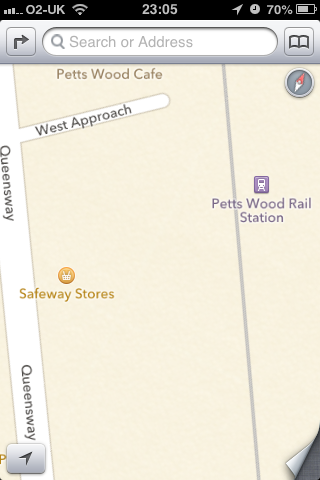
Safeway. Might still exist in US. Taken over in UK by Morrisons in 2004l
Safeway. Yes, still exists in US, but this is Petts Wood, Kent. Still a supermarket here, taken over in UK by Morrisons in 2004

I understand that Apple did conduct a beta of Maps, but if they did, they either didn’t have many beta testers in the UK, or the ability to let them correct bad data wasn’t great, or the feedback simply didn’t make it to the released version.

But, that’s okay, now it’s released, it can be corrected by crowd-sourcing – i.e. getting our paying customers to do our jobs for us – right?

Well, there is a “report a problem” option, but that doesn’t seem to be working well, either it’s too hard to report an inaccurate place-mark, there’s a colossal backlog of reports, or they are going straight to the bitbucket.

If only they had bothered to actually get some local knowledge, obvious clangers like these could have been sifted out early in the process.

Why a little thing called BCP38 should be followed

A couple of weeks ago, there was a DDoS attack billed as “the biggest attack to date” which nearly broke the Internet (even if that hasn’t been proved).

If you’ve been holidaying in splendid isolation, an anti-spam group and a Dutch hosting outfit had a fallout, resulting in some cyber-floods, catching hosting provider CloudFlare in the middle.

The mode of the attack was such that it used two vulnerabilities in systems attached to the internet:

  • Open DNS Resolvers – “directory” servers which were poorly managed, and would answer any query directed to it, regardless of it’s origin.
    • Ordinarily, a properly configured DNS resolver will only answer queries for it’s defined subscriber base.
  • The ability of a system to send traffic to the internet with an IP address other than the one configured.
    • Normally, an application will use which ever address is configured on the interface, but it is possible to send with another address – commonly used for testing, research or debugging.

The Open Resolver issue has already been well documented with respect to this particular attack.

However, there’s not been that much noise about spoofed source addresses, and how ISPs could apply a thing called BCP 38 to combat this.

For the attack to work properly, what was needed was an army of “zombie” computers, compromised, and under the control of miscreants, which were able to send traffic onto the Internet with a source address other than it’s own, and the Open Resolvers.

Packets get sent from the compromised “zombie army” to the open resolvers, but not with the real source IP addresses, instead using the source address of the victim(s).

The responses therefore don’t return to the zombies, but all to the victim addresses.

It’s like sending letters with someone else’s address as a reply address. You don’t care that you don’t get the reply, you want the reply to go to the victim.

Filtering according to BCP 38 would stop the “spoofing” – the ability to use a source IP address other than one belonging to the network the computer is actually attached to. BCP 38 indicates the application of IP address filters or a check that an appropriate “reverse path” exists, which only admits traffic from expected source IP addresses.

BCP stands for “Best Current Practice” – so if it’s “Best” and “Current” why are enough ISPs not doing it to allow for an attack as big as this one?

The belief seems to be that applying BCP 38 is “hard” (or potentially too expensive based on actual benefit) for ISPs to do. It certainly might be hard to apply BCP 38 filters in some places, especially as you get closer to the “centre” of the Internet – the lists would be very big, and possibly a challenge to maintain, even with the necessary automation.

However, if that’s where people are looking to apply BCP 38 – at the point where ISPs interconnect, or where ISPs attach multi-homed customers – then they are almost certainly looking in the wrong place. If you filter there, if you’ve any attack traffic from customers in your network, you’ve already carried it across your network. If you’ve got Open Resolvers in your network, you’ve already delivered the attack traffic to the intermediate point in the attack.

The place where BCP 38 type filtering is best implemented is close to the downstream customer edge – in the “stub” networks – such as access networks, hosting networks, etc. This is because the network operator should know exactly which source IP addresses it should be expecting at that level in the network – it doesn’t need to be as granular as per-DSL customer or per-hosting customer, but at least don’t allow traffic to pass from “off net” source addresses.

I actually implement BCP 38 myself on my home DSL router. It’s configured so it will only forward packets to the Internet from the addresses which are downstream of the router. I suspect my own ISP does the “right thing”, and I know that I’ve got servers elsewhere in the world where the hosting company does apply BCP 38, but it can’t be universal. We know that from the “success” of the recent attack.

Right now, the situation is that many networks don’t seem to implement BCP 38. But if enough networks started to implement BCP 38 filtering, the ones who didn’t would be in the minority, and this would allow peer pressure to be brought to bear on them to “do the right thing”.

Sure, it may be a case of the good guys closing one door, only for the bad guys to open another, but any step which increases the difficulty for the bad guys can’t be a bad thing, right?

We should have a discussion on this at UKNOF 25 next week, and I dare say at many other upcoming Internet Operations and Security forums.